Your office copier lease looked like a great deal three years ago. Now the expiry date is six weeks away, the meter reading is climbing, and someone from "accounts" just asked: are we keeping this thing? Hong Kong copier leases auto-renew quietly by default, and the difference between a smooth exit and an expensive mess usually comes down to what you did in the last 60 days. Here is a practical, step-by-step checklist built for SMEs, IT managers and office admins.
Step 1: Find the Contract and Read the Small Print (60–90 Days Out)
Before you do anything else, pull the original lease agreement and check four line items:
- Notice period — most HK leases require 60 to 90 days' written notice. Miss it and you roll into a new term automatically.
- Auto-renewal clause — some renew for 12 months at the same rate, others at a higher "standard" rate.
- Minimum volume / shortfall penalty — if you committed to 5,000 pages a month but only printed 3,000, you may owe a shortfall charge at year-end.
- Excess copy charge — typical rates sit around HK$0.08–HK$0.15 per black-and-white page and HK$0.60–HK$1.20 for colour on a fully-serviced plan.
Also note what's included: toner, parts, labour, drum units, delivery of paper, and the 4-hour response SLA that most HK brokers write in. Anything listed as "consumables excluded" becomes your cost the day the contract ends.
Step 2: Take a Meter Snapshot and Reconcile the Numbers
Print or photograph the meter reading on the count report — both total and colour. Then compare it against the last invoice and your internal print logs (most Ricoh, Xerox, Konica Minolta and Canon devices email a monthly counter report you can pull from the web interface).
Quick sanity check
If your meter says 180,000 pages but invoices only show 150,000, you have 30,000 unbilled pages waiting at end-of-lease. At HK$0.10 per page that's HK$3,000 — worth catching before the final settlement, not after.
Discrepancies are common when a machine has been swapped mid-contract or when a technician resets counters after a board replacement. Ask for a written reconciliation at least three weeks before expiry.
Step 3: Inspect the Machine and Document Its Condition
Most leases include a "fair wear and tear" clause, but vendors vary wildly on what that means. Walk the machine and photograph:
| Area to check | What vendors charge for | Typical HK$ exposure |
|---|---|---|
| Cracked or scratched platen glass | Full glass replacement | HK$800 – HK$2,000 |
| Missing paper trays / bypass unit | Parts replacement | HK$1,500 – HK$4,000 |
| Broken ADF feeder | Assembly swap | HK$1,200 – HK$3,500 |
| Stickers, tape residue, missing toner | Cleaning / consumables | HK$300 – HK$800 |
| Missing network cable, power cord, manuals | Accessories | HK$200 – HK$500 |
Get the vendor to sign off on condition before the pickup date. In humid Hong Kong summers, paper-feed rollers warp and drums oxidise — if you don't document it now, you may be billed for damage that happened through normal use.
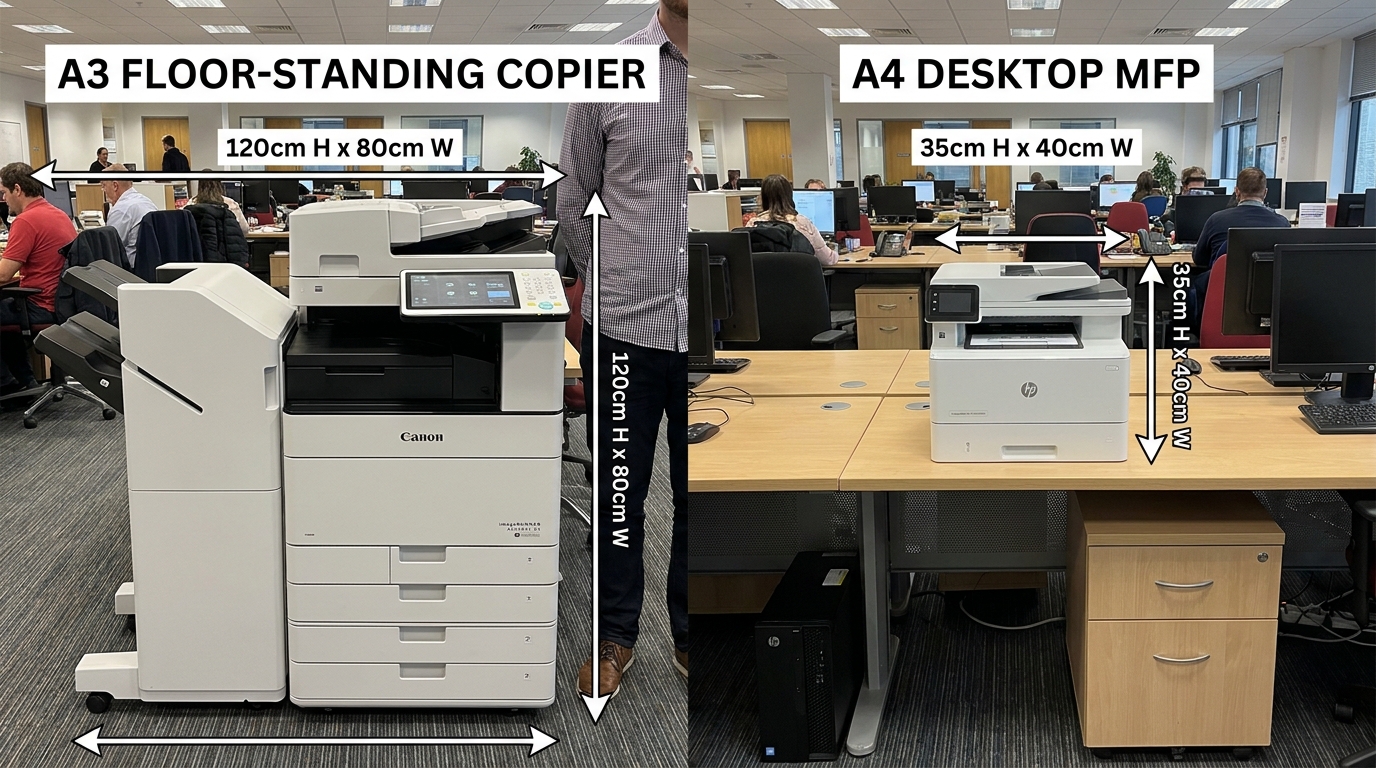
Step 4: Plan the Logistics — Lifts, Loading and Timing
Removal is not free, and it's rarely simple. A floor-standing A3 copier can weigh 80–150 kg. Confirm:
- Lift access — book the service lift with your building management and check the weight limit. Kwun Tong and Kowloon Bay industrial buildings are usually easy; Grade-A offices in Central require a lift booking form and often a deposit.
- Loading bay / truck parking — some buildings only allow removal before 10am.
- Who pays removal — many HK leases charge HK$500–HK$1,500 for collection unless you're signing a new contract.
- Data wipe — the hard drive holds scanned and printed documents. Ask for a written confirmation of secure wipe or request to retain the drive.
Step 5: Compare — Renew, Replace or Buy Out
Use the last 12 months of meter data to price three options side by side.
| Option | Monthly cost (A3 colour MFP) | Watch out for |
|---|---|---|
| Renew existing lease | HK$1,200 – HK$2,600 | Rate creep, old machine, same SLA |
| Swap to new machine, new lease | HK$1,500 – HK$3,200 | Setup fee, delivery lead time |
| Buy out at market value | HK$2,000 – HK$6,000 one-off | You pay for parts and toner after |
| Refurbished purchase | HK$4,500 – HK$12,000 one-off | No SLA unless you add a service plan |
For most HK SMEs printing under 3,000 pages a month, a fully-serviced lease is still the best value because toner and 4-hour on-site support are bundled. If you're printing fewer than 800 pages a month, a Brother or Pantum desktop unit on a purchase basis is usually cheaper than any contract.
{{IMAGE: A comparison chart on a whiteboard in a Hong Kong office showing three copier options — renew, replace, buy out — with monthly costs in HKD listed alongside}Step 6: Put Your Notice in Writing
Verbal notice does nothing. Send a dated email to the vendor's account manager and their billing department, referencing your contract number and stating the expiry date and your intention. Keep the delivery receipt.
If you plan to renew, use the leverage — end-of-term is the single best moment to renegotiate the per-page rate, add a free colour upgrade, or remove that automatic annual increase clause. Vendors would rather keep your account at a thinner margin than lose a machine outright.
End-of-Lease Action Checklist
- ☐Locate original contract; confirm notice period and auto-renewal terms
- ☐Record final meter reading (total + colour) and photograph the report
- ☐Reconcile meter vs. invoices; query any shortfall or excess charges
- ☐Inspect machine and photograph all damage; get condition sign-off
- ☐Book service lift, loading bay and truck access with building management
- ☐Confirm data wipe or retain the hard drive
- ☐Get quotes for renew / replace / buy-out before the deadline
- ☐Send written notice by email; keep the receipt
- ☐Arrange temporary printing cover if there's a gap between machines
Work through this list 60 to 90 days out and the whole process takes a few phone calls. Leave it to the final fortnight and you'll be paying for a machine you don't want, at a rate you never agreed to — and paying for the lift booking too.
Need Expert Advice?
Our consultants can help you find the perfect printing solution for your office.
📞 +85221164877 · King Copier · Operated by Techieasy Limited